
MCP
Tokio has an MCP server, so an AI assistant on the computer running Tokio can do what you’d do in the app: pick TTS voices, create alerts, add sounds from MyInstants, request songs, switch profiles, run the countdown, pause everything and more.
Turn it on
Section titled “Turn it on”-
In Settings → Remote control, check Enable remote control. The overlay server must be on too.
-
Click Show QR code and key. Under the code are the MCP address,
http://127.0.0.1:37891/mcp, and the setup for the assistant you pick under AI assistant, with your key in it.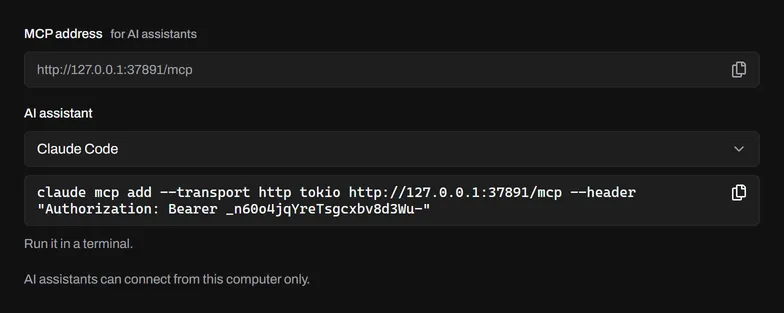
The MCP server only answers on the computer running Tokio, and every request needs the key. The button next to Remote control’s title makes a new key, so update your assistant’s setup after using it.
Connect your assistant
Section titled “Connect your assistant”In Settings → Remote control, pick your assistant under AI assistant and click its setup to copy it. Where it goes depends on the assistant:
Run it in a terminal:
claude mcp add --transport http tokio http://127.0.0.1:37891/mcp --header "Authorization: Bearer <key>"Add it to ~/.codex/config.toml:
[mcp_servers.tokio]url = "http://127.0.0.1:37891/mcp"
[mcp_servers.tokio.http_headers]Authorization = "Bearer <key>"
Run it in a terminal. --scope user adds Tokio for every folder:
gemini mcp add --scope user --transport http --header "Authorization: Bearer <key>" tokio http://127.0.0.1:37891/mcpAdd it to ~/.cursor/mcp.json:
{ "mcpServers": { "tokio": { "url": "http://127.0.0.1:37891/mcp", "headers": { "Authorization": "Bearer <key>" } } }}In VS Code, run MCP: Open User Configuration from the Command Palette and add it there:
{ "servers": { "tokio": { "type": "http", "url": "http://127.0.0.1:37891/mcp", "headers": { "Authorization": "Bearer <key>" } } }}Claude Desktop starts local MCP servers as programs, so it reaches Tokio through mcp-remote, which needs Node.js. Add it to claude_desktop_config.json, then restart Claude Desktop:
{ "mcpServers": { "tokio": { "command": "npx", "args": [ "-y", "mcp-remote", "http://127.0.0.1:37891/mcp", "--allow-http", "--header", "Authorization:${AUTH_HEADER}" ], "env": { "AUTH_HEADER": "Bearer <key>" } } }}Keep Authorization: without a space after it: on Windows, Claude Desktop splits the arguments at spaces. Claude Desktop’s own connectors can’t reach a server on your computer.
What it can do
Section titled “What it can do”| Tool | What it’s for |
|---|---|
get_status |
The connection, the LIVE’s numbers, the active features, the pause, the profile, the music, Minecraft, the countdown, the overlay server and app updates |
get_activity |
The LIVE’s recent chat, gifts, follows, shares, Super Fans and joins, and its top gifters |
get_settings, describe, update_settings |
TTS, music, alerts, active features, the activity feed, the app’s settings, shortcuts, the countdown, the games overlay and Minecraft |
list, get, save_item, test, remove |
Alerts, game actions and the games overlay’s rows, Overlay Studio overlays, test overlays, overlays with their settings and the official catalog, sounds, images and videos, Minecraft pictures, profiles, fans, LIVEs and the song queue. They also list the gifts, emotes and voice engines to pick from, and test a voice or a translation |
control |
Skip the song, stop TTS, replay the last alert, pause and resume |
live |
Connect to your LIVE or disconnect |
profile |
Switch, create or clone profiles |
music |
Request, remove, skip or go back to songs, and connect or disconnect the player |
timer |
Start, pause, stop or reset the countdown, and add or remove time |
list_voices |
Find voices by engine, language or name |
search_sounds, add_to_library |
Find sounds on MyInstants, and add sounds, images, videos or Minecraft pictures |
install_overlay, save_overlay_settings |
Install or update official overlays, and change an overlay’s settings |
edit_studio_overlay, preview_studio_overlay |
Add, change, move or remove single elements and groups of an Overlay Studio overlay, and get a picture of the overlay to check how it looks |
set_key |
Set your Euler Stream, voice engine or Spotify keys |
get_gifters, clear_history |
Coin stats’ top gifters, and clearing your LIVE history |
Good to know
Section titled “Good to know”- Tools that delete or overwrite, like removing an alert or a sound, are marked so your assistant asks you first, if it asks for confirmation (most do).
- Chat, names and gift names reach the assistant as viewer data. Tokio tells it not to follow instructions in them, but keep an eye on what it does with them.
- It can’t read your keys, open file dialogs, export files, clone a voice, install a Tokio update, turn off the overlay server or change remote control.
- Changes it makes show in Tokio as you’d see your own, notices included.
- From WSL2,
127.0.0.1reaches Windows only with mirrored networking.