
Text-to-speech
Tokio reads chat messages aloud as they come in.
-
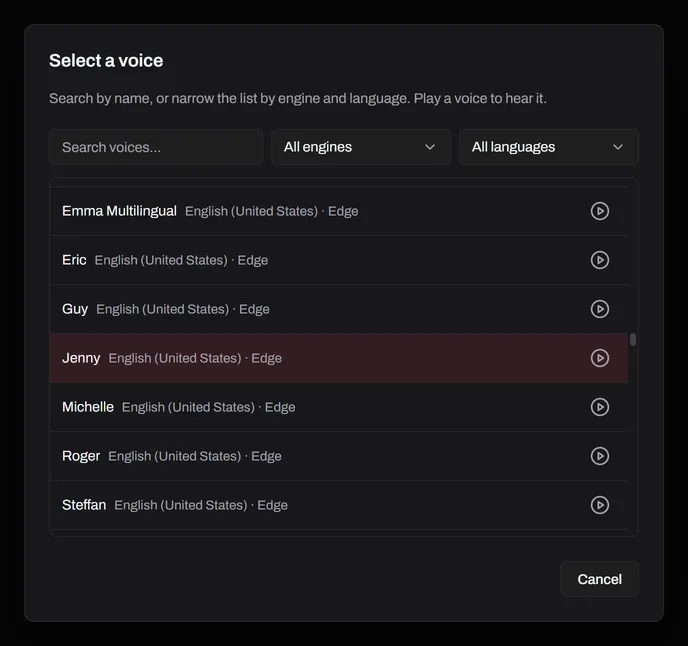
On the TTS page, click the voice and pick one from the list.
-
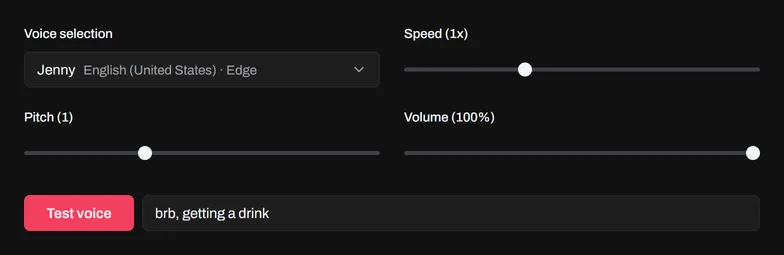
Set the speed, pitch and volume, type a message and press Test voice.
-
On Home, turn on TTS under Active features.
Test voice applies your replacements, Remove emojis and banned words, so a message with a banned word or nothing left to read shows a notice instead.
The format, the length limit and the permissions don’t apply to the test, so it can play a message chat would skip.
Voices
Section titled “Voices”| Engine | Notes |
|---|---|
| TikTok | TikTok’s voices. They go through ottsy.weilbyte.dev, a proxy run by a third party, which gets the text of every message they read. Add your TikTok session ID in Settings → Voice engines to skip it. |
| Edge | Microsoft Edge’s voices. |
| Windows | The voices installed on Windows, SAPI and OneCore, 32-bit ones included. |
| ElevenLabs | The voices in your ElevenLabs account, cloned ones included, with your own API key in Settings → Voice engines. They speak all of ElevenLabs’ languages and use your account’s credits. ElevenLabs gets the text of every message they read. |
| Fish Audio | The voices in your Fish Audio account, cloned ones included, and the library voices Fish Audio licensed from their owners, with your own API key in Settings → Voice engines. They speak all of Fish Audio’s languages and are paid from your account’s balance. Fish Audio gets the text of every message they read. |
| Cartesia | Cartesia’s voices and the ones you cloned, with your own API key in Settings → Voice engines. Each speaks the language it was made for, and they use your account’s credits. Cartesia gets the text of every message they read. |
| Inworld | Inworld’s voices and the ones you cloned, with your own API key in Settings → Voice engines: its Base64 value from Inworld’s Portal. They’re paid from your Inworld account. Inworld gets the text of every message they read. |
Search the list, filter it by engine and language, and play any voice before you pick it.
Clone your voice
Section titled “Clone your voice”Have chat read in your own voice, cloned with ElevenLabs, Fish Audio, Cartesia or Inworld.
-
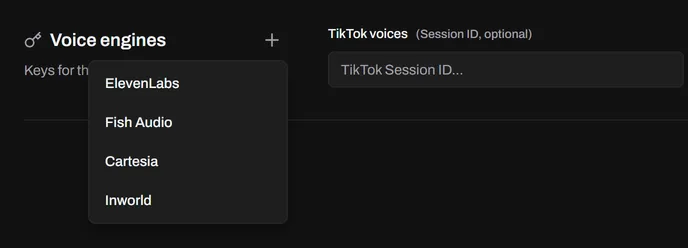
Create an API key in your account with one of them. In Settings → Voice engines, add the service with + and paste the key there. The table below says what each one needs.
-
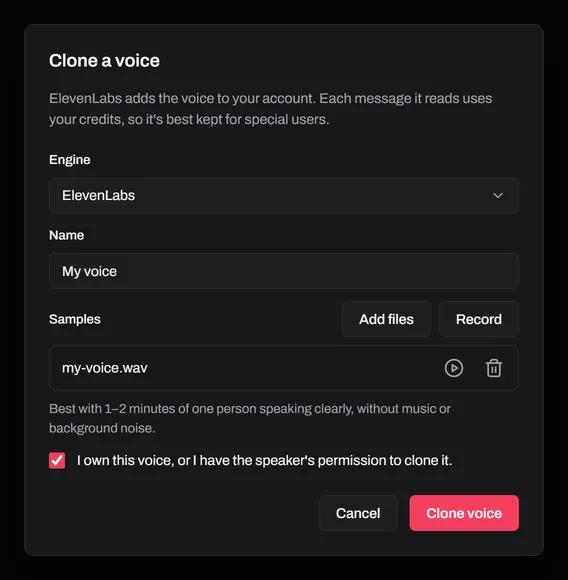
On the TTS page, click Clone a voice, the microphone next to Voice. It shows once a key is set, and with more than one you pick the Engine first. Name the voice and add samples: audio files, or a recording you make there with Record.
-
Check that the voice is yours or that you have the speaker’s permission, then click Clone voice.
-
Give the new voice to a special user under Special users, and keep a free voice for the rest of chat. It also works for all of chat or an alert’s message, but you pay for every message it reads.
| Engine | To clone, you need | Best samples |
|---|---|---|
| ElevenLabs | A paid plan, and a key with access to Text to Speech and read and write access to Voices | 1 to 2 minutes |
| Fish Audio | Balance in your account, which is pay as you go | 10 to 60 seconds |
| Cartesia | The Pro plan or a higher one | 10 to 60 seconds |
| Inworld | A key with write access. Paste its Base64 value from Inworld’s Portal. | 10 to 30 seconds |
Samples work best with one person speaking clearly, without music or background noise. A recording stops by itself at the longest length in the table. Cartesia and Inworld learn from a single clip, so Tokio joins your samples into one, up to that length.
Costs, limits and deleting a voice
Every message a voice from these services reads is paid from your account with it. On a busy LIVE, reading all of chat with ElevenLabs can spend 30,000 credits in an hour or less, while one special user’s messages last many LIVEs. To cap what a LIVE can spend there, set a credit limit on the API key in ElevenLabs. When your credits or balance run out, Tokio tells you, and the voice stays quiet until you add more or pick another one. Meanwhile, Tokio tries that service again once a minute, or right away when you change its key.
A voice takes up to 10 samples of up to 25 MB each: MP3, WAV, M4A, OGG, FLAC or WebM files. Tokio sends them only to the service you clone with and doesn’t keep them. To rename or delete a cloned voice, use that service’s website.
Special users
Section titled “Special users”Give some viewers a voice of their own: under Special users, add their @handle and pick a voice for each. Their messages still go through the format, permissions and protection, and are read at the same speed, pitch and volume as everyone’s.

Format
Section titled “Format”Read every message, or only the ones that start with a dot, a slash or a command of your own.
Choosing Custom command fills in !tts, which you can change. The command isn’t read aloud, and with the command left blank nothing is read.
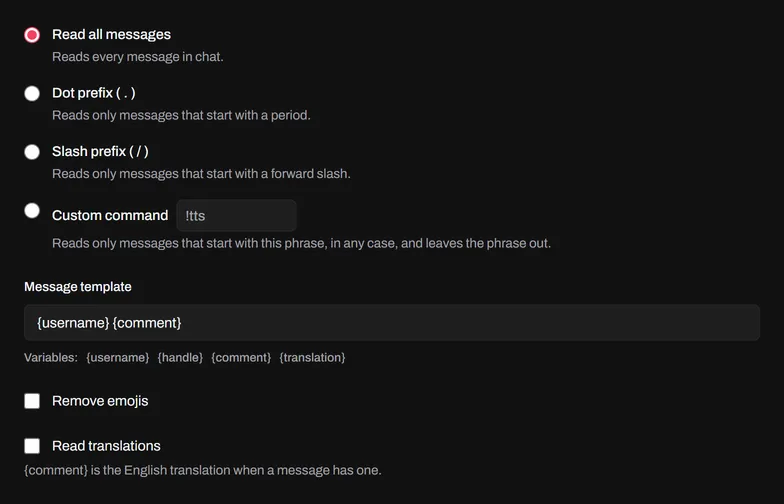
The Message template sets what’s read:
| Placeholder | Replaced with |
|---|---|
{username} |
The viewer’s display name |
{handle} |
The viewer’s handle, without the @ |
{comment} |
The chat message |
{translation} |
The message’s translation, or the message as typed when it has none |
{username} {comment} reads “Lucia hi from Lima!”. Remove emojis leaves emojis out, and skips messages that are only emojis.
Read translations reads a message’s translation in place of {comment}, when Chat translation gave it one. Until you pick a language in Settings → Chat translation, it’s grayed out and {translation} isn’t offered.
A message is skipped when the filled template has no letter, number or emoji, like {comment} with “?” alone.
Replacements
Section titled “Replacements”Teach the voice to say acronyms, slang and names. Each one swaps a whole word, in any case, and applies before Remove emojis, so ❤️ can become “love”.

Permissions
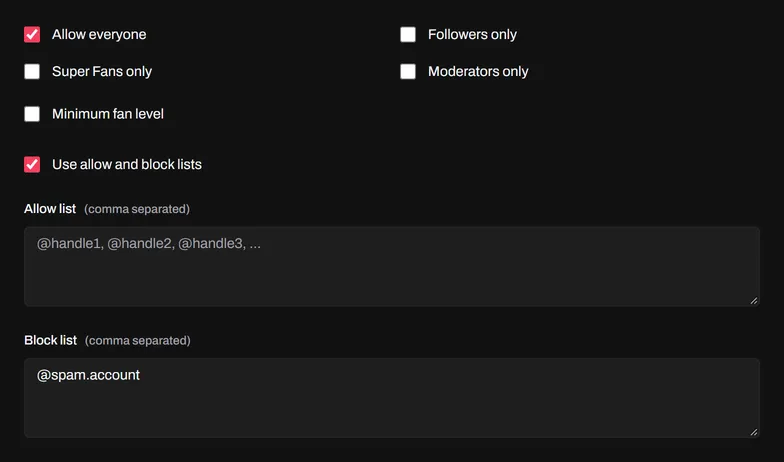
Section titled “Permissions”Uncheck Allow everyone, then check Followers only, Super Fans only, Moderators only or Minimum fan level. Until you check one, everyone still talks, and a viewer who matches any checked one gets through.
Twitch chatters never pass Followers only or Minimum fan level: Twitch’s chat doesn’t say who follows, and has no fan levels. Moderators only includes you, and Super Fans only lets your Twitch subscribers talk.
YouTube chatters never pass Followers only or Minimum fan level either, since YouTube has no followers or fan levels. Moderators only lets your channel’s moderators and you talk, and Super Fans only its members.
Kick chatters never pass Followers only or Minimum fan level either, since Kick has no followers or fan levels. Moderators only lets your moderators and you talk, and Super Fans only your subscribers and founders.
With Use allow and block lists, an allow list with names lets only them talk. @handles on the block list are never read, even when they’re on the allow list.
Protection
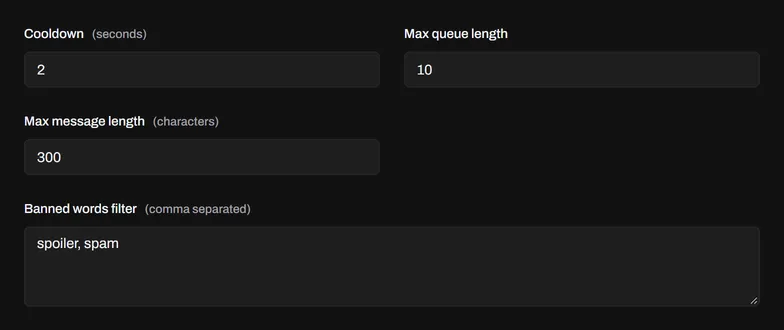
Section titled “Protection”The Cooldown is the seconds between two messages, for all of chat. Messages that come while the queue holds Max queue length messages are dropped.
Messages over the Max message length, or with a banned word in the comment, name or @handle, are skipped, even with look-alike letters or hidden characters. So is a message whose translation is over that length. A banned word also matches inside other words, so banning “ass” skips “class” too.
Replacements, Remove emojis, banned words and the block list also apply to alerts that speak. Music has its own permissions.