
Fans
Fans, in Tools, lists the viewers with a fan level that Tokio has seen in your LIVEs.
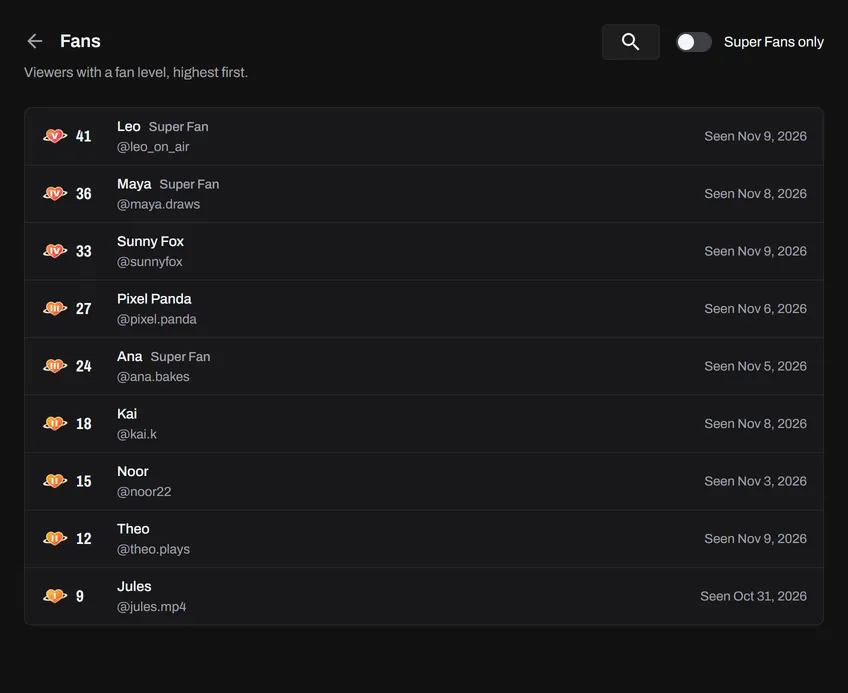
The highest level comes first and, at the same level, the fan seen most recently. Each row shows the fan’s TikTok badge and level, their name and @handle, and when Tokio last saw them.
TikTok sends a viewer’s fan level only when they do something in the LIVE, like joining, chatting, liking, sending a gift, sharing or following. A fan joins the list the first time they do, and their level and name update each time they come back.
Fans are TikTok’s: Twitch, YouTube and Kick have no fan levels, so their viewers never join the list.
Fans can’t be removed. One who left your fan club stays listed at their last level.
Super Fan after a name marks a fan who subscribes to you. Tokio learns it when they chat, send a gift, become a Super Fan or join your LIVE as one.
Turn on Super Fans only to list just them.
The search button finds a fan by name or @handle.
Overlays can show your fans: they get the 100 highest levels. See Fans to build one.
How fans are saved
Each profile keeps its own fans on your computer, up to 5,000. Past that, the fan Tokio hasn’t seen for the longest goes.
Tokio saves them every 30 seconds and when a LIVE ends.
Exports leave fans out, and a cloned or imported profile starts with none.