
Chat translation
Viewers who chat in another language get translated into yours. Tokio translates each message once, as it arrives, and every feature gets the same translation.
Turn it on
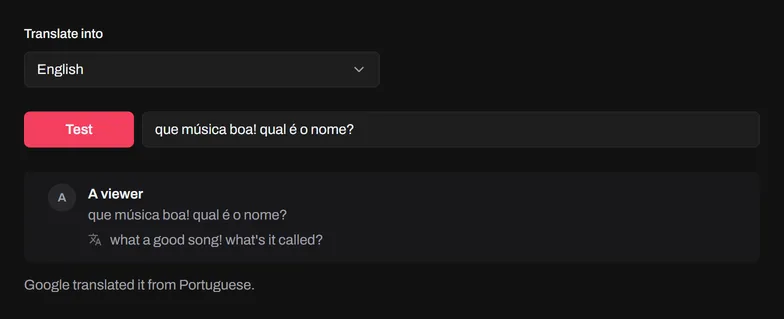
Section titled “Turn it on”In Settings → Chat translation, pick your language under Translate into. Off, the default, translates nothing. Google translates for free, with no account to set up.
To try it, type a message in another language next to Test. Tokio shows it the way Home’s feed will, and says which language it came from.
What gets translated
Section titled “What gets translated”TikTok tags each message with its language. Tokio translates the ones tagged with a language other than yours, and leaves these as typed:
- messages TikTok didn’t tag, like those with only emotes
- Twitch’s, YouTube’s and Kick’s chat, which have no language tag
- music commands like
!play <song>, song name included - messages with a keyword that your alerts, game actions, Overlay Studio elements or countdown timer react to
- an overlay’s own chat command, like
!socialsfor Social Links
With a TTS command like !tts, the command stays as typed and the rest is translated. @mentions stay as typed too. Commands and keywords keep working either way, since they read what the viewer typed.
Where it shows
Section titled “Where it shows”| Where | What you get |
|---|---|
| Home | The translation under the message, in the Activity feed |
| TTS | With Read translations checked under Format, the translation is read in place of the message |
| Alerts, game actions and Overlay Studio | {translation} in a message or text: the translation, or the message as typed when it wasn’t translated. It’s offered while a language is picked |
| Overlays | The chat event’s translation, for overlays that show it. See Events |
Good to know
Section titled “Good to know”- Each message in another language goes to Google.
- A translated message reaches every feature a moment later, usually under half a second. Messages that need no translation aren’t held up.
- Google limits how fast it answers, so Tokio sends it one message a second, after a burst of up to 10. When more come at once, a message that would wait over 2 seconds stays untranslated.
- When Google doesn’t answer, chat stays untranslated for a minute, then Tokio tries again.
- Google’s service isn’t an official public API, so it may slow down on very busy LIVEs or stop working.